MetaTrader 5 · Telegram · Discord

Post every MT5 trade to your Telegram channel automatically.

Stop typing signals by hand. Signal Sender watches your MetaTrader 5 account and posts entries, SL/TP changes, partial closes and results — with a chart screenshot — the moment they happen.

Works with manual trades and any Expert Advisor · Your own bot, no third-party server

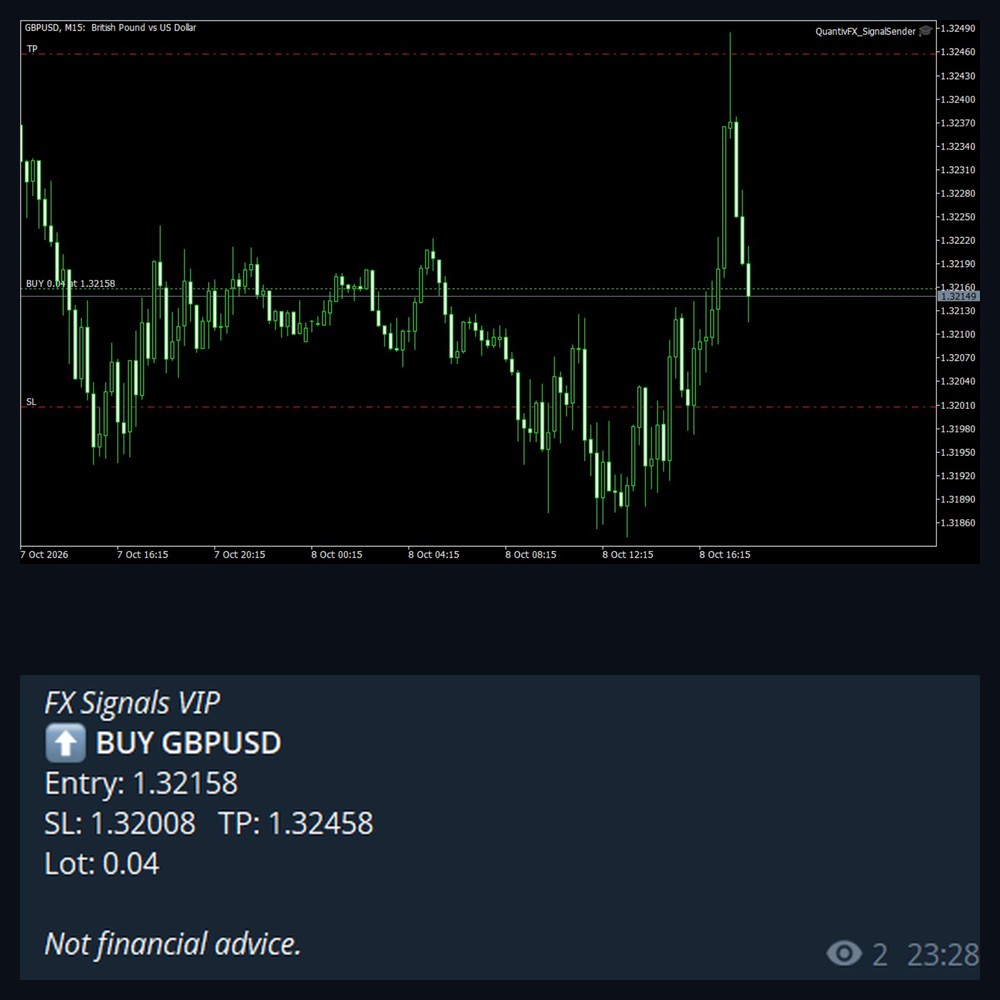
MT5 chart with entry, SL and TP and the Telegram message of the same trade

What your members receive

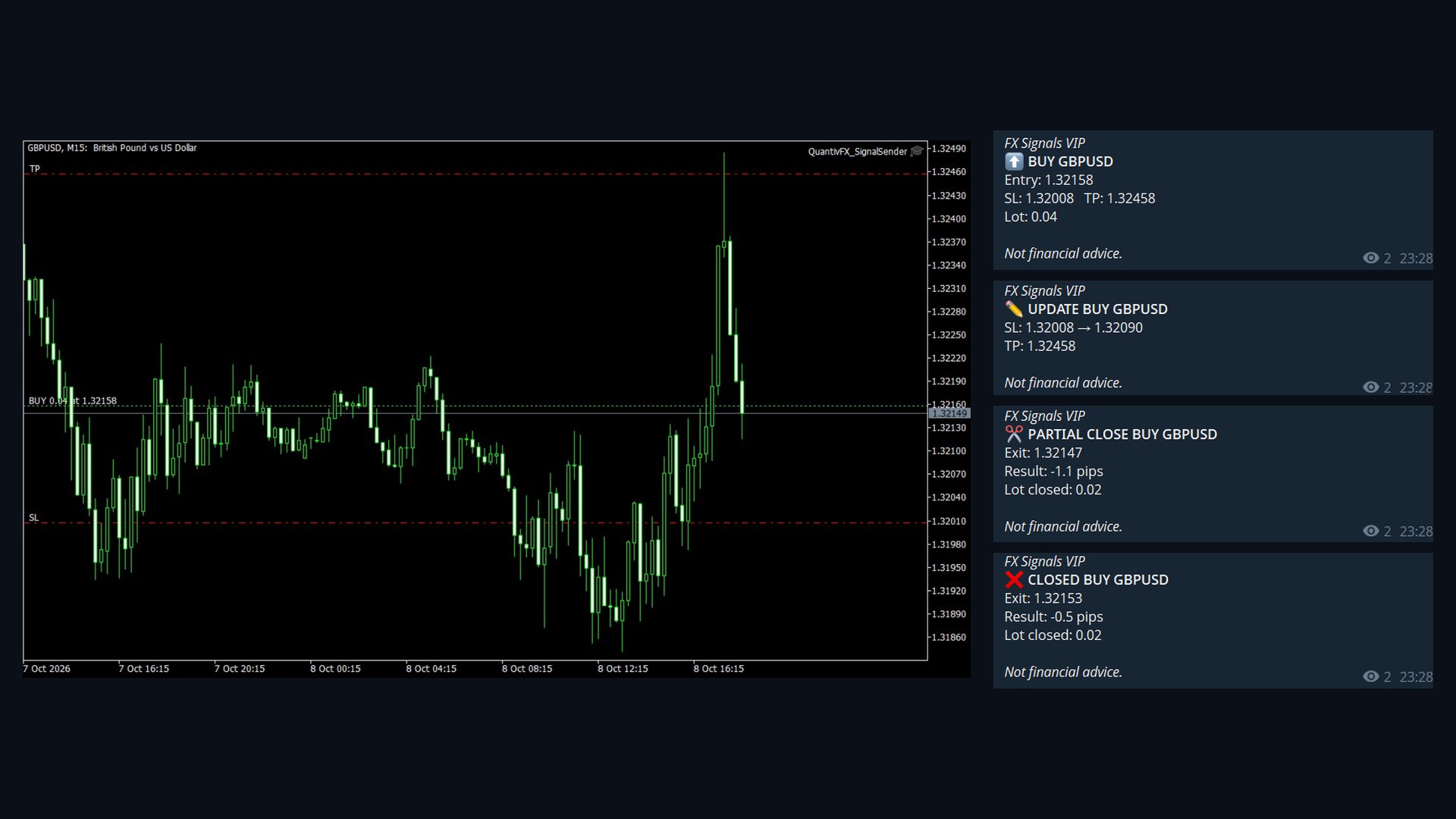
Real messages from a test channel, posted by Signal Sender.

Chart with entry, SL and TP lines and the four Telegram messages of one trade
New positionBUY / SELL with entry, SL, TP and lot
SL / TP changedOld and new level, or "move SL to break-even"
Partial closeExit price, closed lot and result
Position closedExit price and result in pips (TP / SL hit)
Pending ordersPlaced, cancelled or expired
Chart screenshotOptional picture with every message

Built for signal channel admins

Everything you need to run a clean, consistent channel.

Your own bot

Messages go straight from your MT5 to your Telegram bot. No middle server sees your trades.

Publish only what you want

Filter by symbol and by EA magic number, or send manual trades only.

Telegram + Discord

Post to a channel, a group and a Discord server at the same time.

Your branding

Header and footer on every message — your channel name and your own disclaimer.

Pips, money or neither

Choose what your members see. Account money is hidden by default.

Automatic reports

Daily, weekly and monthly results posted as a clean image card — win rate, total pips and a cumulative chart.

VIP + free channel

Post live to VIP, and results only to your free channel with a delay — a built-in way to grow VIP.

Delay & templates

Hold a new trade a few seconds to set SL/TP first, and write messages in your own format.

Set up in 5 minutes

A step-by-step PDF guide is included with every license.

Create a bot

Message @BotFather in Telegram and copy the token.

Add it to your channel

Make the bot an administrator with "Post messages".

Allow WebRequest

Add api.telegram.org and quantivfx.com in MT5 options.

Attach to a chart

Paste the token and chat ID. Done — one chart covers all symbols.

Pricing

One license = one MT5 account number. Pay with USDT/crypto.

Free trial

$0 / 30 days
  • Full features
  • For signal channel admins
  • No payment details needed
Request on Telegram

Monthly

$35 / month
  • Full features
  • Updates included
  • Cancel anytime
Best value

Lifetime

$99 one-time
  • Full features
  • All future updates
  • Telegram + Discord in one license

Questions

Does Signal Sender trade for me?

No. It never opens or closes trades on your account. It only reports trades that you or your Expert Advisors make.

Do I need to keep MT5 running?

Yes — MT5 must be running for messages to be sent. For 24/7 reporting run it on a VPS.

Which brokers and symbols are supported?

Any MT5 broker and any symbol: forex, gold, indices, crypto. You can limit it to the symbols you choose.

Can I use it with my own Expert Advisor?

Yes. Attach Signal Sender to a different chart (MT5 allows one EA per chart). Filter by magic number to publish only that EA.

How is the license delivered?

After payment your license is activated for the MT5 account number you entered and you receive a download code by email for the file and the PDF guide.

I run a channel. Can I try it first?

Yes — message @quantivfx_support with your MT5 account number and channel link for a free 30-day license.